Testing and Quality Assurance
Set up and test your MPEG-H Audio environment with speaker setup and loudness normalization guides as well as the required test signals.
MPEG-H Audio Showcase Files

Deliver Emotions
Audio: MPEG-H Audio
Video: HEVC
212 MB
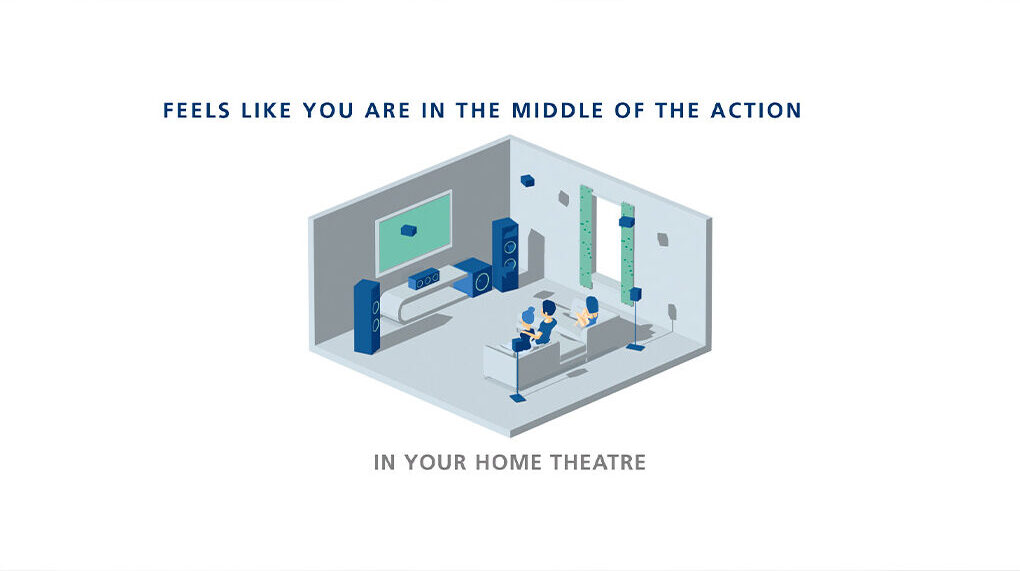
MPEG-H How To
Audio: MPEG-H Audio
Video: AVC
170 MB

One Day in Berlin
Audio: MPEG-H Audio
Video: HEVC
615 MB
[1] © 2020 Fraunhofer-Gesellschaft zur Förderung der angewandten Forschung e.V. and/or its licensors. Produced by: Fraunhofer IIS/IAN
[2] © 2018 Fraunhofer-Gesellschaft zur Förderung der angewandten Forschung e.V. and/or its licensors. Produced by: Fraunhofer IIS/Es ist Winter
[3] © 2016 Fraunhofer-Gesellschaft zur Förderung der angewandten Forschung e.V. and/or its licensors. Produced by: Fraunhofer IIS/gretchen GmbH
MPEG-H Audio Test Routine Items
WAVE (.WAV)
MPEG-H BWF/ADM
PCM with embedded ADM
231 MB
MPEG-4/QuickTime (.MOV)
PCM with Control Track
ProRes422
8,6 GB
MPEG-4 (.MP4)
MPEG-H 3D Audio
HEVC
1 GB
WAVE (.WAV)
MPEG-H Production Format (MPF)
PCM with Control Track
1 GB
License Information
The audio and video test material made available for download on this website is licensed under Creative Commons Attribution-NonCommercial-NoDerivatives 4.0 International License (CC BY-NC-ND 4.0) solely for the purpose of your testing MPEG-H Authoring and Reproduction.
To view a copy of this license, visit Creative Commons.
MPEG-H Audio Test Material for DAWs
Get started with creating personalized, immersive audio experiences. To give you an idea of all the options you have when working with MPEG-H Audio, we provide a range of Audio and Video Test Material, and demo sessions for you to download.
MPEG-H Authoring Demo Session for Pro Tools
620 MB
Requires Avid Pro Tools Ultimate 2026.4 or later
This package contains a Pro Tools session file and all media assets required for the Authoring with Pro Tools.
To create labels using Chinese, Japanese, Korean characters, MPEG-H Authoring requires additional resources. You can download the required font here and then install it by moving it to your Operating System’s Fonts folder.
Teach Yourself with our Pro Tools Tutorials
MPEG-H Authoring Demo Session for Nuendo
181 MB
Requires Steinberg Nuendo 13
This package contains a Nuendo session file and all media assets required for the Authoring with Nuendo.
To create labels using Chinese, Japanese, Korean characters, MPEG-H Authoring requires additional resources. You can download the required font here and then install it by moving it to your Operating System’s Fonts folder.
Teach Yourself with our Nuendo Tutorials
The audio and video test material made available for download on this website is licensed under Creative Commons Attribution-NonCommercial-NoDerivatives 4.0 International License (CC BY-NC-ND 4.0) solely for the purpose of your testing MPEG-H Authoring and Reproduction.
To view a copy of this license, visit Creative Commons.
Loudness Normalization and Target Loudness
The perfect volume for the playback of media content is a highly individual issue. A seamless experience where all content is played back at a similar loudness level is not. Make sure your loudness normalization works just as it should to deliver the best possible experience.
Older audio codecs are known for delivering content at varying levels of loudness. Even though a “louder” codec might initially be perceived as performing better, the disparity in playback loudness can interrupt the experience by forcing users to adjust the volume. That’s why advanced codecs such as MPEG-H Audio contain loudness information. It is the basis for evening out content pieces recorded at different loudness levels and ensures a seamless experience where users don’t have to adapt the volume of each content piece manually.
Use the test signals provided below to check if the loudness normalization of your MPEG-H Audio, AC-3, and E-AC-3 content works properly. Unlike these three codecs, AAC-LC does not include loudness information. Our test setup uses this fact to help you determine the target loudness of a playout device by comparing the normalized loudness level of MPEG-H Audio, AC-3, and E-AC-3 with the non-normalized one of AAC-LC.
Loudness Test Signals
Channel and Sync Check Signals for MPEG-H Audio
The following test signals will help you to verify that your speakers are connected correctly and that they are playing back MPEG-H Audio content at the correct volume and balance. These signals are provided under the End User License below for audio professionals and enthusiasts to use in setting up a MPEG-H Audio playback system.
Note that all signals include a seven-second silent leader.
Set-Up Guide
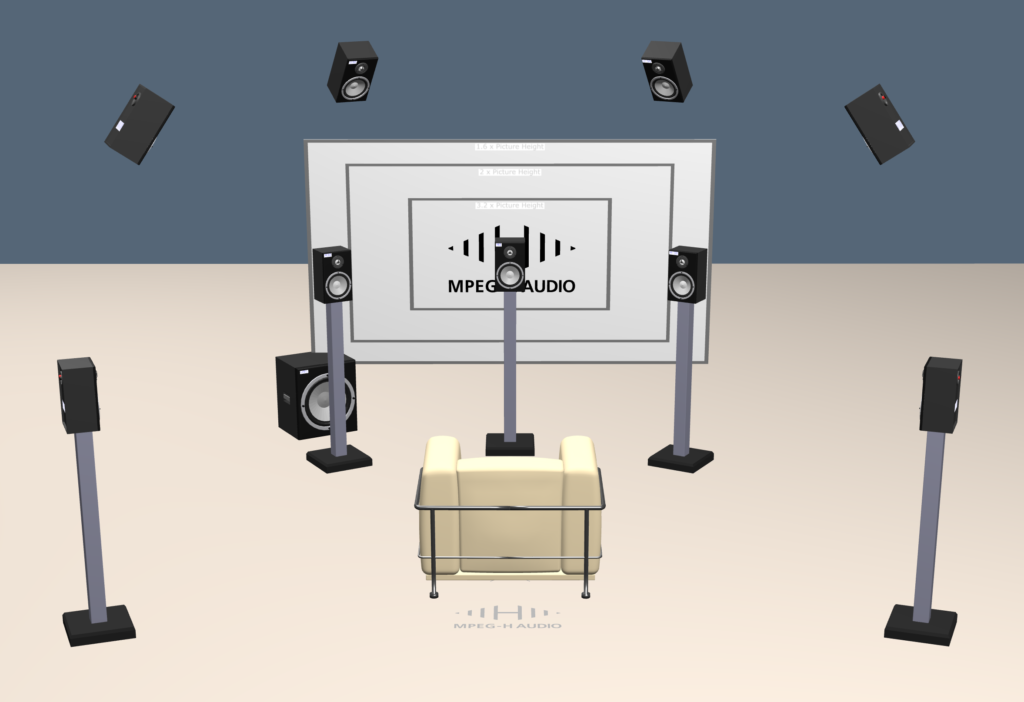
Begin by checking your speaker connections using the channel check signals. The channel announcements should come from the correct speaker as described below. There are test signals for the popular 5.1 + 4 and 7.1 + 4 speaker configurations, as well as a general signal that announces all defined speaker locations in the MPEG-H standard. You should use the 5.1 + 4 signal for 5.1 or 5.1 + 4 speakers, and the 7.1 + 4 signal for 7.1 or 7.1 + 4 speakers.
Adjust the level of each speaker using a sound level meter (slow C weighting) so they are identical at the listening position using the level alignment signal.
Adjust the level of the subwoofer, if any, to the same sound level reading as in (2) above using the LFE level alignment signal.
If you are monitoring for professional purposes, set the monitoring level using the reference reproduction level signal.
Check for proper lip sync using the lip sync test signals.
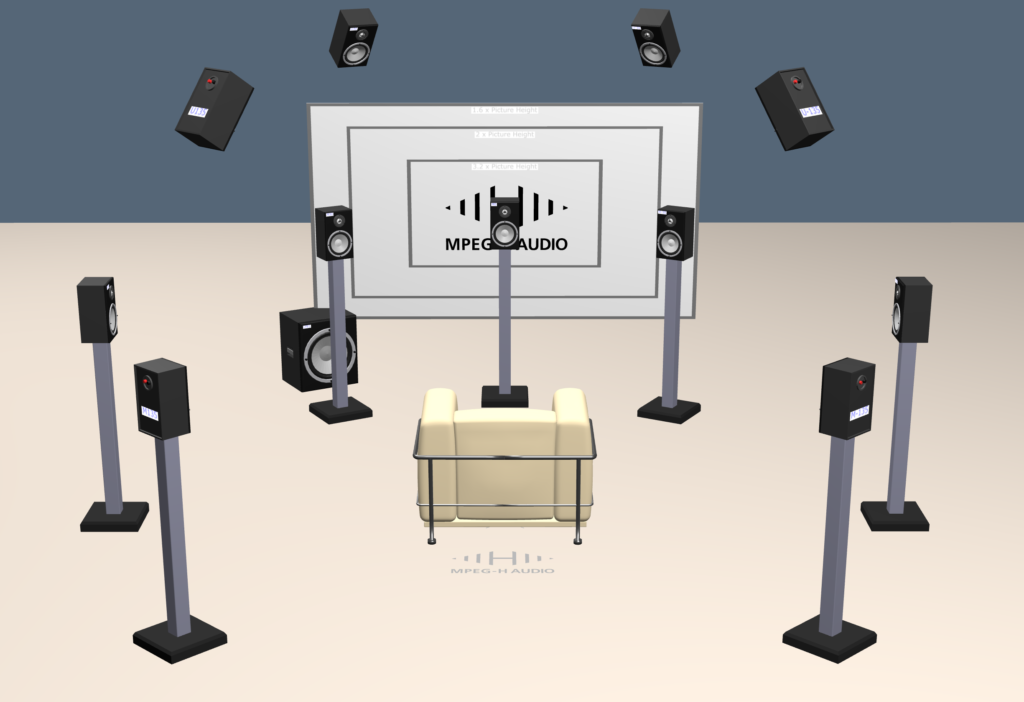
Technical Notes:
The channel check test signals are announced using the layer and azimuth notation defined in ITU-R BS.2051-2: The letter U refers to the upper or overhead speaker layer, the letter M to the Middle layer placed at ear height, and the letter L to the bottom or lower layer placed below ear height. The azimuth value is specified with zero degrees in front of the listener, and values increasing to the listener’s left. Thus, the classic Left speaker positioned at a 30 degree angle to straight ahead is “M+30”, while the corresponding Right speaker is “M-30”. Such a system avoids the ambiguity of text labels such as “front left centre” as the number of speakers is increased in more complex playback systems.
Note: These signals are intended for professional speaker playback. Soundbars and smart speakers that employ psychoacoustic processing may not portray channel check signals exactly in the correct location.
Channel Identification: 5.1 + 4 Speakers
Use this signal to check if the speakers are connected to the correct decoder channels for a 5.1+4 speaker configuration. You should hear the spoken words solely from the announced speaker for each speaker position.
Technical Note: 5.1 and Stereo Playback
This signal may be used to check 5.1 (no overhead speakers) systems by ignoring the announcements for the “U” layer channels, which will be downmixed in the decoder into the “M” layer channels. This signal may also be used to check stereo systems by listening only for the left (M+30) and right (M-30) announcements.
Channel Identification: 7.1 + 4 Speakers
Use this signal to check if the speakers are connected to the correct decoder channels for a 7.1+4 speaker configuration. You should hear the spoken words solely from the announced speaker for each speaker position.
Technical Note: 7.1 Playback
This signal may be used to check 7.1 (no overhead speakers) systems by ignoring the announcements for the “U” layer channels, which will be downmixed in the decoder into the “M” layer channels.
Channel Identification: All Speaker Positions
Use this signal to check if the speakers are connected to the correct decoder channels for more elaborate speaker configurations. You should hear the spoken words solely from the announced speaker for each speaker position that is physically present.
Announcements for speakers that are not present will be rendered to adjacent speakers that are present.
Level Alignment (Channel Balance): 5.1 + 4 Speakers
Use this signal to set all speakers physically present to the same volume, measured with a sound level meter at the listening position set to C weighting and Slow response. The noise on this signal for the normal speaker channels is the same as in the Reference Reproduction Level signal below: 500-2000 Hz pink noise at -24 LKFS (-21.4 dB FS RMS, where the convention of 0 dB FS being a full-scale sine wave is used).
Technical Note: 5.1 and Stereo Playback
This signal may be used to check 5.1 (no overhead speakers) systems by ignoring the signals for the “U” layer channels, which will be downmixed in the decoder into the “M” layer channels. This signal may also be used to check stereo systems by listening only for the left (M+30) and right (M-30) announcements.
Level Alignment (Channel Balance): 7.1 + 4 Speakers
Use this signal to set all speakers physically present to the same volume, measured with a sound level meter at the listening position set to C weighting and Slow response. The noise on this signal for the normal speaker channels is the same as in the Reference Reproduction Level signal below: 500-2000 Hz pink noise at -24 LKFS (-21.4 dB FS RMS, where the convention of 0 dB FS being a full-scale sine wave is used).
Technical Note: 7.1 Playback
This signal may be used to check 7.1 (no overhead speakers) systems by ignoring the announcements for the “U” layer channels, which will be downmixed in the decoder into the “M” layer channels.
Level Alignment (Channel Balance): All Speaker Positions
Use this signal to set all speakers physically present to the same volume, measured with a sound level meter at the listening position set to C weighting and Slow response. Announcements for speakers that are not present will be rendered to adjacent speakers that are present.
Technical Note: Signal Characteristics
The noise on this signal for the normal speaker channels is the same as in the Reference Reproduction Level signal below: 500-2000 Hz pink noise at -24 LKFS (-21.4 dB FS RMS, where the convention of 0 dB FS being a full-scale sine wave is used).
LFE Level Alignment
The three noise segments on this signal should indicate the same level on the sound level meter as the Level Alignment signal’s noise segments when the LFE gain and any bass management is adjusted properly.
Technical Notes: Levels
The noise is presented first in the LFE channel, then the Left channel, then the U+30 channel. A 10 dB difference in the first signal likely indicates an error in implementing the +10 dB gain present in the LFE channel. A reduced level of the third signal may indicate lack of bass management for the upper layer speakers.
Technical Notes: Signal
The noise is 35.5 to 70.8 Hz pink noise at -21.4 dB FS RMS, which is then boosted by an inverse C weighting filter to allow proper measurement with a sound level meter set to C weighting and Slow response.
Technical Notes: Room Effects
At low frequencies, room resonances can greatly affect the sound level heard at a particular location in a room. These signals are primarily for checking for gross errors. A monitor alignment at low frequencies is normally done with more precise signals to analyze room resonances and carefully optimize the subwoofer to main speaker crossover region if a subwoofer is used. Also, if the subwoofer is not capable of flat response to 35 Hz, setting the subwoofer level using this signal may lead to a level that is higher than the main channel due to some frequencies of the noise being attenuated by the subwoofer.
Reference Reproduction Level
Use this signal to set the appropriate listening level:
In consumer or professional systems to harmonize the volume or loudness with other signal sources. The loudness of the noise on this signal is -24 LKFS – a widely-used industry standard level for broadcast TV and internet video content. Users are cautioned that loudness standards for music production are still evolving, and music mastered according to compact disc or radio practices may be 10-15 dB louder.
For professional monitoring according to ATSC A/85, to insure that the tonal and element balance is preserved when mixing or evaluating content in different rooms or facilities. Adjust all the speaker gains for the same output level using the channel check signal, and then adjust the master (all channels) gain for 76.5 dB C slow SPL on the noise portion of this signal, which is reproduced through the left channel only.
This is for rooms of 1500-4999 cubic feet (42.5 to 141.5 cubic meters). The level for other room sizes may be obtained from table 10.2 of ATSC A/85 with a -1.5 dB adjustment due to the level of this signal.
For professional monitoring according to EBU Tech 3343-2016, adjust all the speaker gains for the same output level using the channel check signal, and then adjust the master (all channels) gain for 72 dB C slow SPL on the noise portion of this signal. This level differs from that in Tech 3343 due to the level of this signal.
It should be understood that for consumer listening, you may adjust the playback level to that which suits your taste and listening environment.
The tone on this signal may be used to calibrate playback peak-reading meters to -24 dB RMS Full Scale.
Lip Sync Test for 50 and 59.94 HZ
Use these signals to check the audio vs video delay or “lip sync” in MPEG-H trademarked systems with video playback. The flash and brief tone should be seen and heard at the same time at the listening position, and the initial countdown should agree with the number displayed in the box.
End User License
These signals are provided without charge by Fraunhofer for enthusiasts and professionals to test and align their systems for MPEG-H Audio playback. They are for end-user use only, not for further distribution or product certification or verification. You may not modify, transfer or re-distribute these signals but you may make copies for your own use. You expressly acknowledge and agree that the use of the signal is at your sole risk.
These signals are provided “AS IS” and “AS AVAILABLE” without warranty of any kind. This End User License can be terminated by you or Fraunhofer at any time without notice and will terminate automatically if you fail to comply with any of its terms.
Please do not re-distribute these signals, link to www.mpeg-h.com instead.